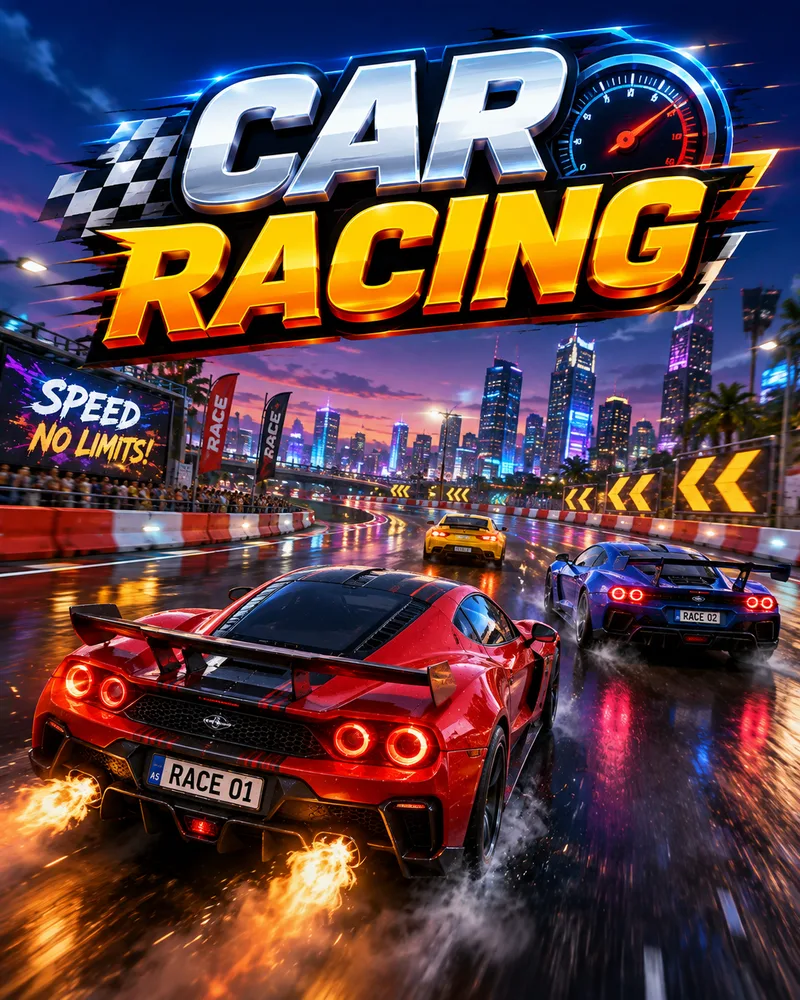
About Car Racing
Car Racing starts you at the back of a four-lane grid with three to five computer rivals strung out ahead. The throttle is not your problem — the car accelerates to its top speed on its own. What you actually control is the line you take: which lane you sit in, when you brake for a gap, and which of the things lying on the road are worth crossing traffic for.
Fuel is the reason the racing line matters. Your tank burns down through the race and a full one will not see you home, so red cans on the tarmac are as much a part of your route as the gaps between rivals. Green cells give an instant nitro burst instead — faster than your top speed, and thirstier while it lasts. Neither is a button: if you want it, you drive over it.
Crashes are a setback, not an ending, and so is an empty tank — you limp rather than stop. Clipping a barrier or rear-ending a rival spins you out and leaves you fighting back through the pack, but the race carries on and so do you. You can play free in your browser with no download, on touch or keyboard, across eight levels: the track stretches from 1,200 to 3,200 metres, the field grows from three rivals to five, traffic thickens, fuel drops thin out, and the quickest rival closes to within a whisker of your top speed.
Controls
There is no throttle control — the car is always accelerating toward its cap. Nitro and fuel aren't buttons either: they lie on the road and you collect them by driving over them. That leaves you two inputs, steering and braking, which is the point on a phone where your thumb is already busy.
Everything works on touch and on a keyboard:
- Changing lane drag across the track, or tap the left or right half of it. On a keyboard, ← → or A D. A lane change slides rather than snaps, and it can't be interrupted halfway, so a mashed key won't judder you between two lanes.
- Brake hold the Brake button, or ↓ / S. Slowing down is how you wait for a gap instead of piling into the back of it.
- Red fuel can drive over it to top up the tank. The gauge sits top-left and turns amber, then red, well before you run dry.
- Green nitro cell drive over it for an instant burst past your top speed. It burns fuel more than twice as fast while it lasts, so a boost taken on an empty-ish tank can cost you the next straight.
- Pause the Pause button, or Esc / P. The race also pauses by itself if you switch tabs or click away, so you never come back to a finished race.
Crashing never ends the race. You keep a fraction of your speed, spin out briefly, and carry on — only your finishing position decides the level.
An empty tank doesn't end it either: you limp at about a third of your top speed until you reach the next can, so running dry costs you places rather than the race. Once per race you can watch a short ad for a full tank instead.
Finish 1st and the next level unlocks automatically. Anything else offers a rematch on the same rung. There are eight levels in all.
Tips
- Plan the fuel, not just the line A full tank won't get you to the finish, so the cans are part of your route rather than a bonus. Look two lanes ahead and pick which one you're going for while there's still road to move across — deciding late is how you end up taking the barrier instead.
- A nitro cell on a low tank is a trap Boost burns fuel more than twice as fast. Grabbing one at 20% can leave you limping through the stretch where you needed the speed. On a healthy tank it's free pace; on a dying one, leave it.
- Braking is faster than crashing A spin-out costs you well over half your speed plus the time to rebuild it. Lifting off for a moment to let a gap open costs a fraction of that. When two lanes are blocked, slow down rather than gamble on the squeeze.
- Commit to the lane change early The slide takes a moment and can't be cancelled once it starts. Decide while the obstacle is still well ahead of you; at top speed, deciding late means arriving mid-slide.
- Watch the rivals, not just the road The position readout tells you how many cars are ahead right now. On the higher levels the leading rival is nearly as quick as you are, so places lost to a crash have to be won back through traffic — the earlier you notice, the more track you have to do it in.
Frequently asked questions
Do I have to control the accelerator?
No. The car builds up to its top speed by itself and stays there. You steer and you brake — that's deliberate, because on a phone your thumb is already busy changing lanes.
Does crashing end the race?
No. Hitting a barrier or a rival spins you out and costs you most of your speed, but you keep going. Only your finishing position matters, so a crash is a setback you can race back from.
How do I get nitro?
You drive over it. Green nitro cells sit on the road, and touching one fires the boost immediately — there's no nitro button to press. Red cans work the same way for fuel.
What happens if I run out of fuel?
You limp at about a third of your top speed until you reach the next can — you don't stop, and the race still finishes. Once per race you can also watch a short ad for a full tank.
What counts as clearing a level?
Finishing 1st. Any other position offers you a rematch on the same level. Winning moves you up the ladder automatically — there's no difficulty menu to set.
How much harder does it actually get?
Considerably. Across the eight levels the track grows from 1,200 to 3,200 metres, the field goes from three rivals to five, traffic thickens, fuel and nitro drops thin out, and the rivals' top speed climbs from 72% of yours to 97% — close enough at the top rung that one spin-out decides the race.
Can I play Car Racing on my phone?
Yes. Drag or tap either half of the track to change lane, with on-screen Brake and Pause buttons — fuel and nitro need no buttons, you just steer over them. It works in any modern mobile browser with no download.
More like this
Popular right now 🔥
All →
Klondike Solitaire
Sudoku
2048

Chess

Ludo

Snake
Block Puzzle
Minesweeper

Checkers
Spider Solitaire
Mahjong Solitaire

Snakes & Ladders
Word Search

Connect Four
Brick Breaker

Tic-Tac-Toe
Bubble Shooter